
I few years ago, I was working on an implementation for a client who was, shall we say, a little too eager to get started with HubSpot.
Before we had even finished the technical setup (specifically before their email settings were configured) they decided to jump the gun. They uploaded a massive legacy list and hit “Send” to over 2 million contacts.
The result was a deliverability apocalypse.
They hit a 16% bounce rate. Over 40 thousand emails bounced instantly.
For context, HubSpot’s trust safety team usually suspends accounts that hit a 5% bounce rate. The next few weeks were all-hands-on-deck for damage control, list scrubbing, and reputation repair just to keep their portal from being shut down.
This is an extreme example, but if you aren't actively managing your sender reputation, you're actively damaging your brand's ability to reach your customers.
Here's how to fix your email deliverability within HubSpot, stay out of the spam folder, and keep your domain reputation spotless:
1. Set Up Your Email Sending Domain(s) Properly
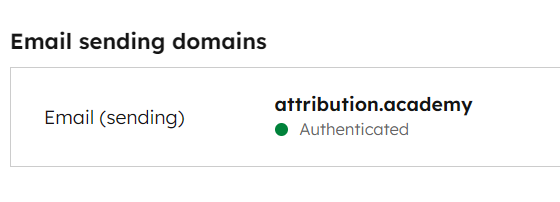
If you are sending emails without these three acronyms configured, you look so suspicious to email providers that you might as well be walking into a bank with a ski mask on.
-
SPF (Sender Policy Framework): Tells the world HubSpot is allowed to send email on your behalf.
-
DKIM (DomainKeys Identified Mail): Adds a digital signature to prove the email wasn't tampered with.
-
DMARC: Tells email providers what to do if an email fails the check (you want this set to "quarantine" or "reject" eventually).
Go to Settings > Content > Domains & URLs. If your "Email Sending Domain" status isn't "Authenticated", go fix it now.
2. Respect the Bounce (Or Get Suspended)
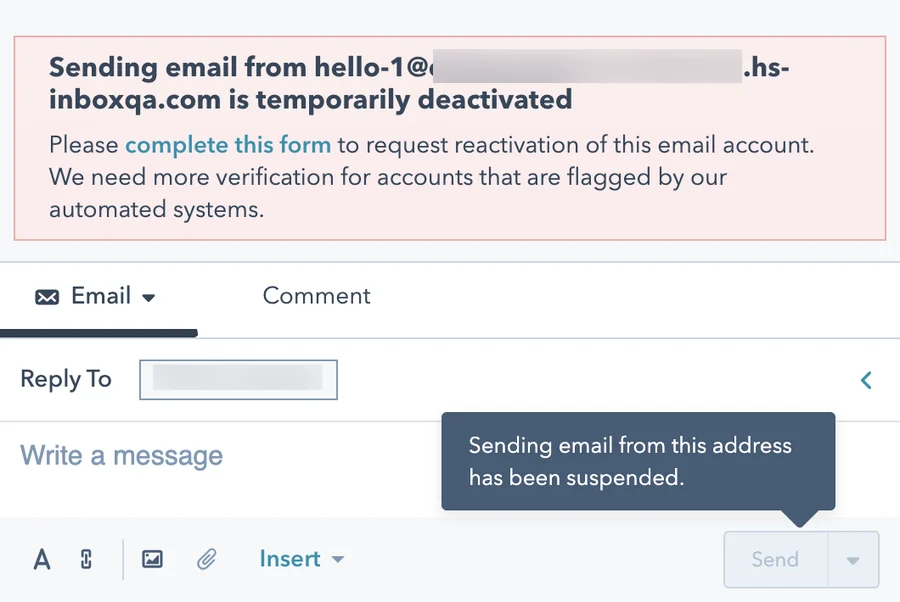
HubSpot is incredibly protective of its own sending reputation, which means they are incredibly strict with yours.
If you try to blast a cold list you bought off the internet, you are going to have a bad time. HubSpot’s "Deliverability Protection System" will suspend your marketing email access if you hit these thresholds:
-
Hard Bounce Limit: 5%. If 5 out of every 100 emails hard bounce (meaning the address doesn't exist), you are in the danger zone.
-
Spam Report Limit: 0.1%. That is 1 in 1,000. It takes very few angry people to get you shut down.
A single email send might not get you shut down, but if your average over a month or so of email sends exceeds these limits, you could be in hot water.
To avoid this, never import a list you haven't verified. If you have a list of contacts you haven't emailed before, run them through a validation tool like NeverBounce before you import them into HubSpot.
You can also integrate a verification tool to verify your marketing list on an ongoing basis, helping you to avoid sending to emails that were previously valid, but have become invalid (like when someone changes jobs).
3. Purge the Zombies
"Graymail" refers to emails sent to people who opted in but never open them. Sending to these contacts hurts you in two specific ways:
-
Reputation: Email providers like Gmail see low engagement and assumes your content is bad, filtering you to the Promotions tab for everyone.
-
Cost: You are paying HubSpot for these "Marketing Contacts" even though they generate zero value.
To solve this, you need a two-pronged approach.
-
Purge without deleting: Create an Active List of "Unengaged Contacts" (e.g., "Last Marketing Email Open Date is more than 52 weeks ago"). Run a workflow to set their "Marketing Contact Status" to Non-Marketing Contact. You stop paying for them, but keep the data.
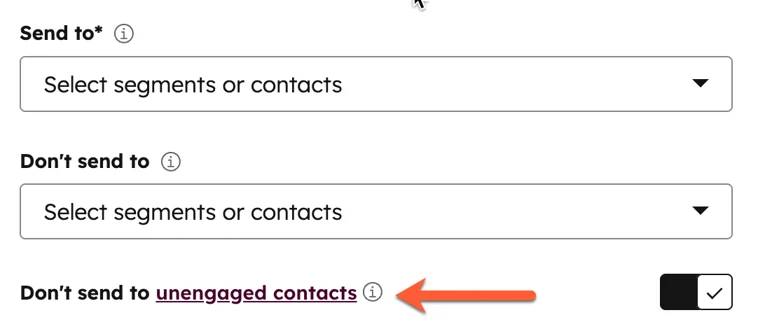
- Set up a guardrail: In your email settings, check the box for "Don't send to unengaged contacts." HubSpot will automatically exclude anyone who hasn't opened your last 11-16 emails, immediately boosting your open rate. This is great if you still need some unengaged contacts to stay marked as Marketing Contacts for advertising purposes.

This newsletter is sponsored by Seventh Sense. Interested in sponsoring Hubsessed? Email [email protected].
Unlock Hidden Revenue in Your Email Strategy with Seventh Sense
Your emails are powerful, but only if they reach inboxes. Seventh Sense reveals the deliverability insights and optimization opportunities that most marketers miss, directly impacting your bottom line.

Why teams choose Seventh Sense:
➤ Deep deliverability diagnostics beyond basic metrics
➤ Intelligent send-time optimization for every recipient
➤ Advanced personalization that drives engagement
➤ Seamless HubSpot integration
Marketing teams consistently report higher open rates, improved engagement, and more qualified leads. When your emails land in inboxes and resonate with recipients, revenue follows.


4. Warm Up Your Sending Domain(s)
This is where my client went wrong. Even if your authentication is perfect, if you suddenly start sending 50,000 emails a day from a new domain (or a dormant one), ISPs like Google will block you immediately. They need to "learn" that you are a good sender first.
If you are migrating to HubSpot or launching a new dedicated IP, follow a warm-up plan.
-
Start Small: Send to your most engaged segment first (people who opened in the last 30 days).
-
Ramp Slowly: Start with 500 emails on Day 1. If bounce rates stay low, double it to 1,000 on Day 2, then 2,000, and so on.
5. Check the "Health" Tab Regularly
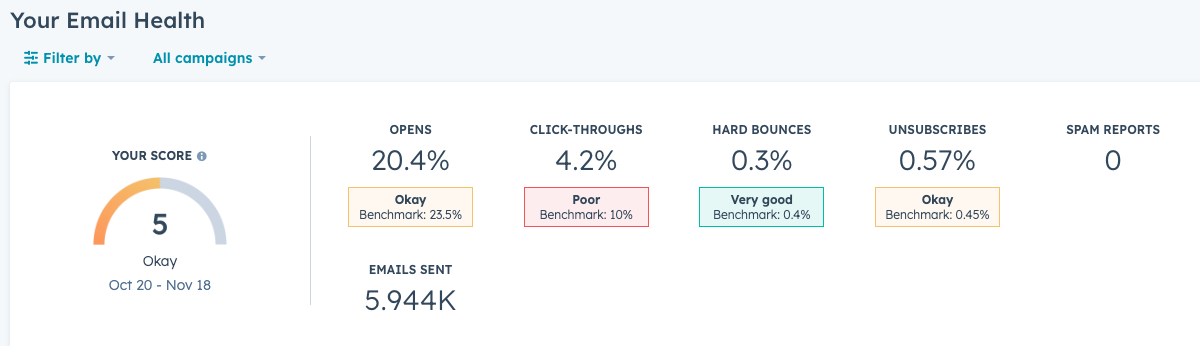
You don't have to guess where you stand. HubSpot has a built-in diagnostic tool that most users completely ignore.
Navigate to Marketing > Email and click the Health tab.
This gives you a score from 1-10 based on your open rates, click-throughs, hard bounces, and unsubscribes compared to companies in your industry.
- Score 8+: You are in the clear—for now.
- Score 5-7: You are average, but at risk. One bad list import could tank you.
-
Score < 5: Your house is on fire. Stop sending immediately and start cleaning your lists.
Pro-Tip: Don't just look at the aggregate score. Look at the Hard Bounces metric. If this is trending up, your list hygiene process is failing. And if your Unsubscribes and Spam Reports are spiking, it means you need to work on your content strategy.
You can spend thousands of dollars on flawless copy and beautiful design, but if your technical foundation is rotten, you are effectively setting that budget on fire.
Don't let a technicality kill your marketing in 2026. Take an hour this week to audit your settings, authenticate your domain, and clean up your lists. The most effective marketing campaign is the one that actually arrives.





Responses