
We are mere days away from INBOUND25 and I am absolutely slammed between prep for the conference and finalizing the content for the Attribution Mastery Certification course. But, I didn't want to leave you all high-and-dry without a newsletter this week, so I hit up my good friend Kevin Sundeen, Founder of Sly Orange and all around RevOps (or, as I like to call his work, KevOps) mastermind.
That's right, this is the very first Hubsessed guest post!
Kevin and I first met 3 years ago when he was a client of mine at Aptitude 8. Since then, we've been nerding out about HubSpot, playing through the Halo campaigns together on Xbox Live, and have actually met up a couple times IRL like a couple of real live extroverts.
Recently, Kevin has been hard at work solving a major problem for HubSpot customers who have more than one team working inside their portal, and I think he's come up with a pretty innovative solution. I'll let him take it from here. Enjoy!
- Ryan
Centralize Your Team Activity and Make Handoffs Obvious
If you only have one team in your HubSpot, congrats! You can stop reading here and enjoy a blissful day where no one steps on each others’ toes or ever bobbles handoffs.
Still here? Great. Most of us run multiple motions inside one portal: Marketing, Sales, and Service, subsets within those teams, or even separate instances of those teams supporting multiple business units.
The answer is not spinning up a second portal or hiding teams from each other with permissions, or adding yet another custom object. HubSpot’s superpower is centralization. But out-of-the-box, it can’t tell you the one thing you need to run clean handoffs:
Who engaged last, from which team, and what did they do?
How HubSpot's Default Features Trip You Up
Segmentation and data organization is key, but when it comes to multiple teams, HubSpot doesn’t make it easy.
- Owner fields overwrite history. As ownership flips across teams, you lose who sourced/worked it, and “last activity date” is not team-aware, unless you want to dig through the activity timeline. And still, those data points in the timeline aren’t reportable, unless you get really fancy with cross-object reporting, and even then, it’s not great!
- Engagements live in silos (Outreach, Aircall, Zoom, Gong) unless you push them back to the timeline reliably. Your next team is flying blind.
- “Business Units” (now “Brands”) isn’t for data. The upgrade is useful for marketing assets but it doesn't solve CRM record ownership. And while you could theoretically create multiple portals and integrate them through a data warehouse, for mid-market orgs, centralizing beats splitting portals almost every time: fewer blind spots, cleaner handoffs, saner admin.
So what’s the fix? 3 custom properties and a small set of workflows and dashboards can empower anyone to answer who/which team/how in three seconds. That level of simplicity can make multi-team work feel like one team again.
The Fix: 3 Properties + 2 Guardrails
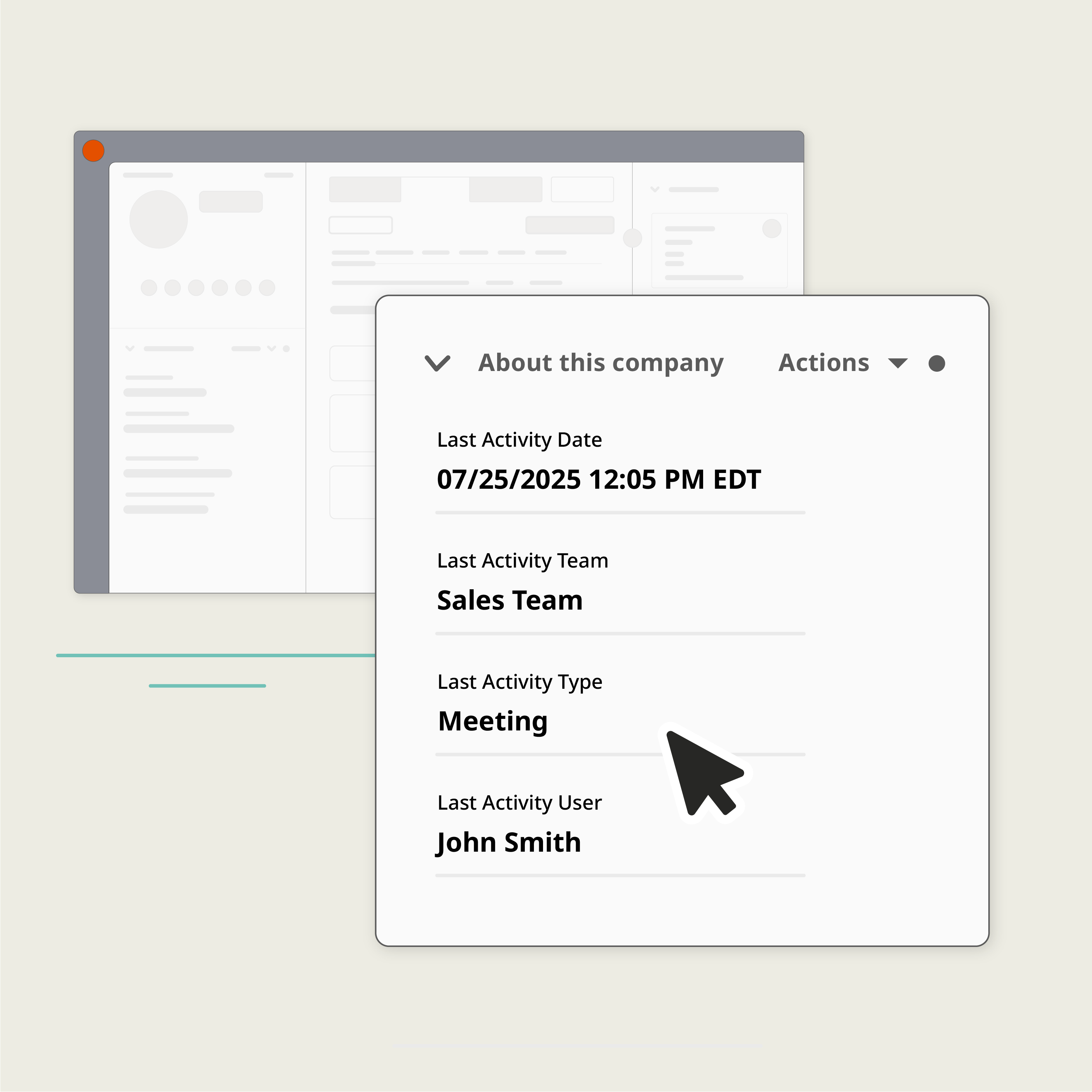
1) Stamp these three fields on all three core objects
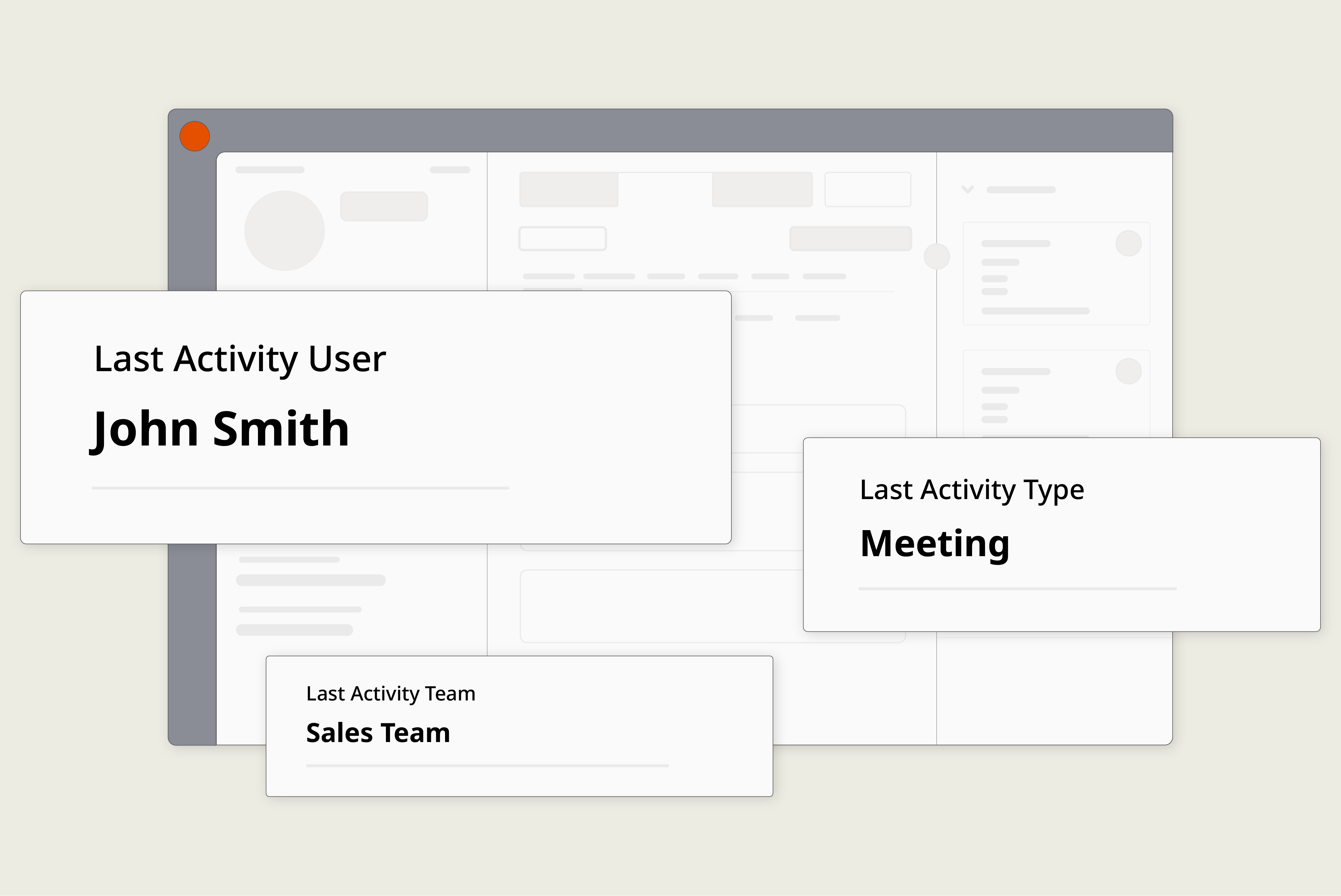
- Last Activity User (who)
- Last Activity Team (which team/brand)
- Last Activity Type (call/email/meeting)
Create them once, then overwrite the value on every new engagement: Keep the three fields visible in the left sidebar for humans and restrict edit access if you are automating it.
Meeting sanity check: Don’t mark “meeting” at booking: meetings only count when they happen. Stamp the meeting after the scheduled time (or when attendance is confirmed) so your momentum isn’t fake.
Normalize sources: Aircall vs Outreach vs Zoom can log differently. Normalize once before stamping these three properties so your data stays consistent.
2) Add two simple guardrails
- Cross-team collision alert: When Last Activity Team is different from the record’s owning team/brand, alert both sides and open a same-day review task. Result: coordination, not collisions.
- Suppression during review (optional): Pause outreach until someone closes the review task to avoid double-touching the buyer. This is a great time to plug in enablement and process enforcement tools like Supered.
Real Life Use Cases
SaaS + Expansion
For when Sales runs upsells and CS manages accounts.
What to add
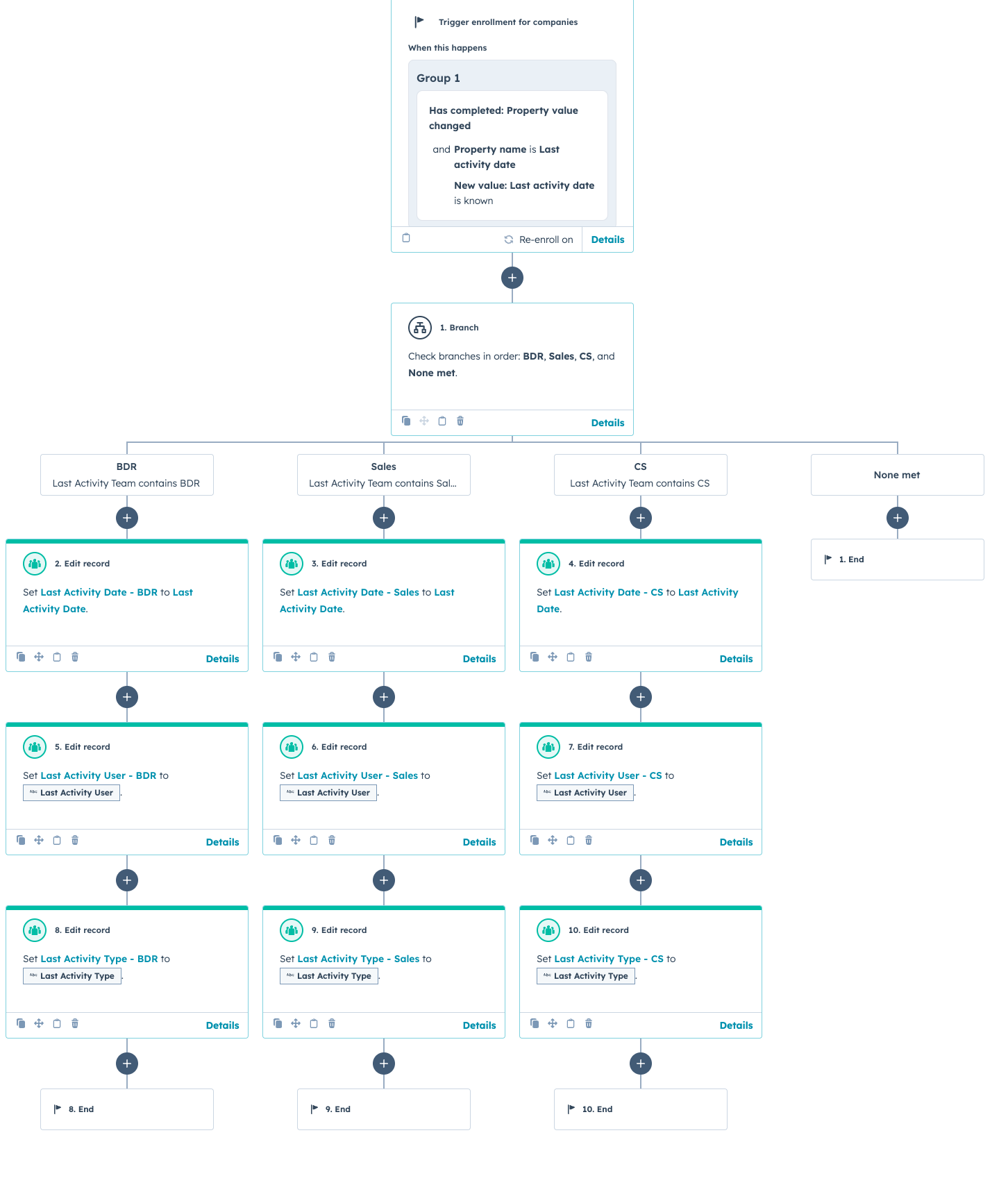
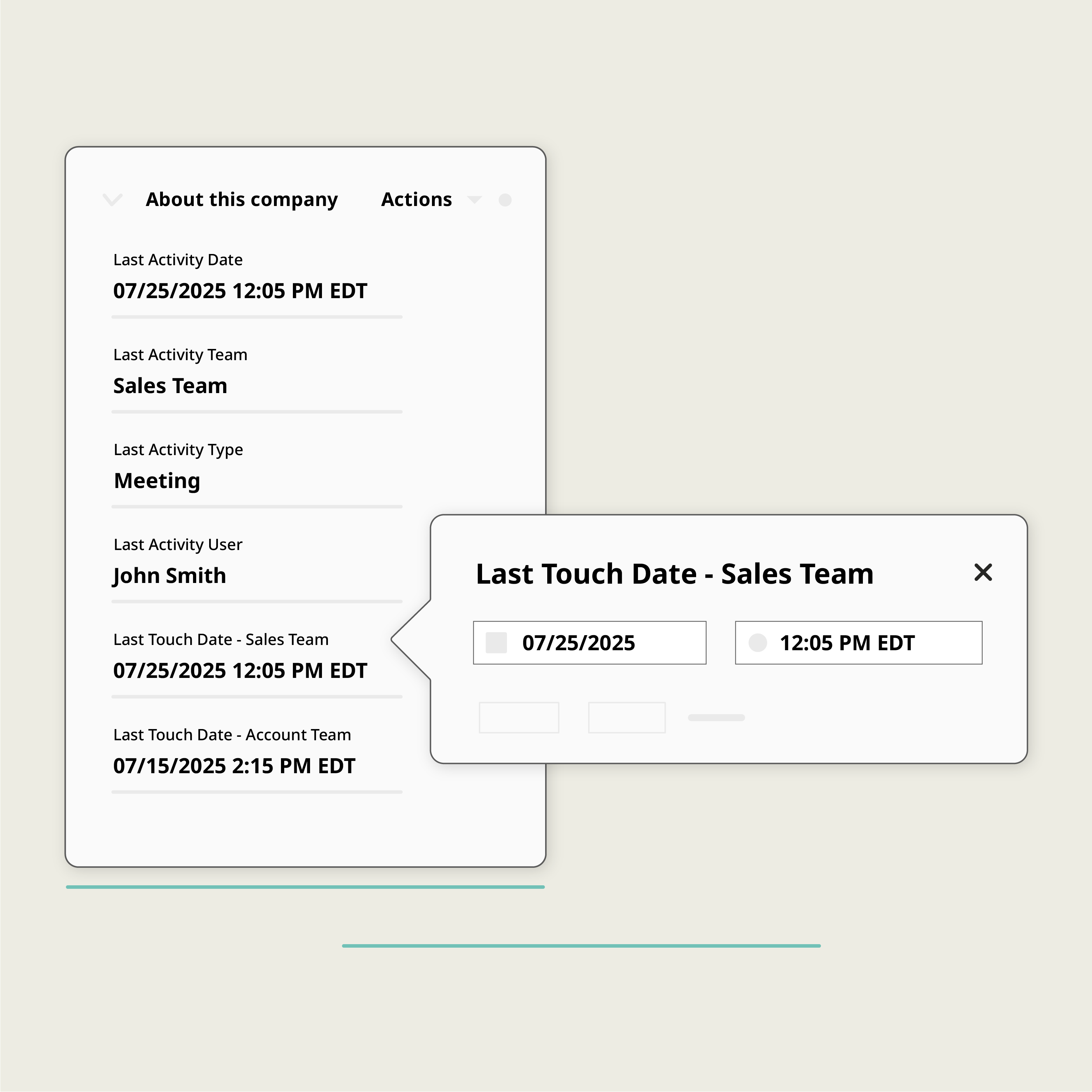
- Per-team dates: Last Touch - Sales, Last Touch - CS (update when Last Activity Team changes). This gives you expansion context and CS coverage at a glance.
- Guardrail: If Sales touches a Customer account, ping the CSM to coordinate the next step. Alternatively, if CS touches a company account that is currently being upsold, you should alert the seller
Measure
- % customers with CS touch ≤ 30 days after closed-won (or whatever makes sense for your business)
- Close-Won → First CS meeting median days (time-to-value).
Agency
For AEs + AMs + Delivery Teams.
What to add
- Team taxonomy that includes Delivery as a team. Your “Last Activity Team” then exposes Delivery touches on the same Company thread. Use the pattern from the workflow above but brand on Delivery vs Account Management. No more email archaeology.
Measure
- Onboarding time (Time between Close-Won to first Delivery call) and exceptions list for accounts with no Delivery touch in 7 days.
Solutions Engineering
For SE/SC involvement on Deals.
What to add
- Treat Solutions Engineering as a team in your user table (which makes it visible in Last Activity Team), and add a Deal checkbox “SE Involved” that flips on if Last Activity Team = SE at any point.
- Optional: Last Touch – SE date to assess an SEs activity on deals.
Measure
- Win rate with SE involved vs not; cycle time impact when SE is engaged early.
The Playbook (Copy-and-Ship!)
Play 1: Lay the foundation
Trigger: Any call, email, or (held) meeting on Contact/Company/Deal.
Action: Overwrite Last Activity User/Team/Type (and update per-team dates if enabled).
Owner: RevOps.
Measure: Median Days Since Last Touch (by team, rep, or account)
Play 2: Cross-team guardrails
Trigger: Last Activity Team changes and doesn’t match the record’s owning team/brand.
Action: Alert both owners + create a review task; (optional) set a suppression flag to pause outreach.
Owner: RevOps workflow; Sales/CS leadership enforces the two-line policy.
Measure: Collision Rate per 1,000 records
Play 3: Expansion Handoff SLA (AE to CS)
Trigger: Deal moves to Closed Won.
Action: Assign CSM; create onboarding task; post to #new-customers with context.
Owner: CSM; RevOps monitors queue.
Measure: Deal Close to first CS meeting ≤ 3 days; alert if missed.
Play 4: BDR to AE speed-to-lead
Trigger: SQL created or demo booked.
Action: Assign AE; create AE follow-up task (24h) + post to #sales-handoff.
Owner: AE next touch; RevOps owns workflow.
Measure: time between SQL and first AE activity ≤ 24h (daily exception list).
Dashboards You Will Actually Look At
Team Recency Heatmaps
Rows: Accounts (by segment/CSM).
Columns: Last Sales Touch, Last CS Touch, Last BDR Touch.
Conditional format by last touch date.
Collisions Over Time
Weekly count of cross-team alerts; investigate spiky weeks.
Handoff SLA
Closed-Won to first CS meeting time; show worst-offender table for action.
Untouched New Customers
Close-Won with no CS touch in 7 days; review the list daily.
Even better, keep it at zero, and notify the CS Lead when an account makes it onto this list!
Gotchas (So You Don't Learn The Hard Way)
Building this automation to stamp the last activity date by team is possible, but frankly, it’s not easy out of the box:
- Activity-first triggers in HubSpot are limited. If you DIY, you’ll lean on “last activity date” plus Ops Hub to fetch the latest engagement and parse the details of the user and team; or use an app to do it in real time.
- Tool logging quirks are real. Normalize Aircall/Outreach/Zoom/Gong before you stamp.
- Meetings ≠ momentum until they happen. Delay meeting stamps until the time passes (or attendance confirmed).
- Brand ≠ Team. If you truly run multi-brand, store Brand as a team and a field, key your guardrails off brand changes where it makes sense.
- Pipelines matter. New vs expansion deals often live in different pipelines. Guardrails should respect pipeline context.
Implementation Checklist
Copy/paste this to your project board!
Create on Contact, Company, Deal
- Last Activity User (user)
- Last Activity Team (single-select)
- Last Activity Type (single-select: call | email | meeting)
- Optional: Last Touch Date by Sales / CS / BDR; Brand (if applicable)
Automate
- Overwrite the three fields on every engagement (handle meeting timing + normalization).
- Cross-team alert workflow when Last Activity Team ≠ owning team/brand.
- (Optional) Sequence suppression during review.
Report
- The 3-4 widgets above + an “owner confirmation” exceptions list.
QA
- One Company, multiple Contacts, two Deals, book/move/cancel a meeting; confirm stamps on all three objects and behavior on reschedules/no-shows.
Build vs. Buy
Be honest about the maintenance
You can build this with Ops Hub/Workflows and custom code, but prepare to spend time wrangling normalization, meeting reschedules, rate limits, and cross-object syncing.
It’s a lot, ask me how I know.
Or you can let an app do the stamping and backfill. Sly Orange was built for exactly this: it creates the three fields on install and updates them via webhooks (with sane meeting handling and cross-record tracking). Then you use those fields to feed your lists, reports, workflows, alerts, and SLAs.
The install takes a minute with your hubspot credentials, and you get up to 10k engagements tracked per month free!
Where you'll be in 2 weeks
- Better prioritization: heatmaps make stale accounts obvious.
- Cleaner handoffs: reps know who owns the next touch.
- Fewer collisions: teams stop stepping on each other.
- Calmer comp: you can trace “who earned this” without starting a war.
Two useful things to do next
- Install Sly Orange to create and maintain those fields in real time, then whip up your workflows and dashboards. The ones I have outlined here are just the start; make them your own. Please email or book some time if you need help or want to kick ideas around! Even better, say hi at Inbound next week!
- Check out the ultimate guide to cross team ownership. We cover why handoffs slip and a few more workflow patterns we didn’t talk about in this newsletter.
This newsletter is sponsored by Sly Orange. Interested in reaching Hubspot customers and partners? Email [email protected] to learn about sponsorship opportunities.



Responses